May 23, 2026 Updates
New
Vital Sign Trending
Apply vital changes gradually over 3–300 seconds instead of instantly, simulating realistic physiological responses to interventions.
Pause / Play / End Trend controls let you freeze, resume, or stop a trend while keeping vitals exactly where they are.
Live countdown and target values (e.g., "HR: 60 → 100 | 40s remaining") so you always know what's in motion.
Synchronized timing: all vitals changed in a single Apply start and finish together.
Server-side execution: trends keep running even if you switch screens or close your tab.
NIBP Blood Pressure Simulation
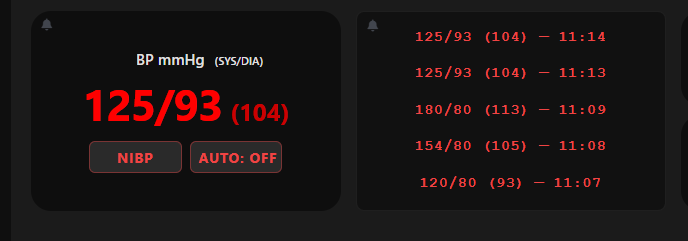
Blood pressure now behaves like a real cuff: values stay hidden until measured, teaching students that BP is a snapshot in time, not a continuous reading.
NIBP Button: Press on the monitor to start a 15-second measurement cycle.
AUTO Cycling: Set automatic measurements at 5, 10, or 15-minute intervals; manual cycles reset the timer.
BP History: The monitor displays the 5 most recent readings with timestamps.
Clear BP Hx: A controller-side button wipes the history between scenarios.
Controller & Viewer Permissions
Sessions now have two access levels, giving instructors full command of who sees what.
Viewers join via QR code or session ID and see only the Display Monitor.
Controllers join via a dedicated controller code with full access to vitals controls.
Auto-Generated Usernames: Every user receives a unique name so instructors can identify devices at a glance.
Session Management Page: Promote, demote, or remove users in real time from a sortable, searchable user table.
Improved
Display Settings Modal
Display Monitor, AED Trainer, Rhythm Identification, and NIBP Auto Cycle toggles have moved off the main controller screen into a clean popup, freeing up valuable screen space during live simulations.
Vitals Values Layout
Changed values are now emphasized so you can instantly spot what's staged to update.
Tighter desktop layout with restructured action buttons and less white space.
Mobile buttons reorganized into a square grid for easier tapping
Smarter Session Codes
Session IDs no longer use the easily-confused characters O or 0.
Typing a session ID now auto-capitalizes — no more case-sensitivity failures when joining.
Fixed
Light/Dark Mode Parity
Controller spacing and layout now match across both themes for a consistent experience.
Tablet UI Cleanup
Vital trend tooltip no longer cut off at the screen edge.
Alarm button icons repositioned away from container borders.
Reduced excess white space between ECG and Shock Outcome dropdowns.