July 2nd, 2026
New
Improved
Fixed

New
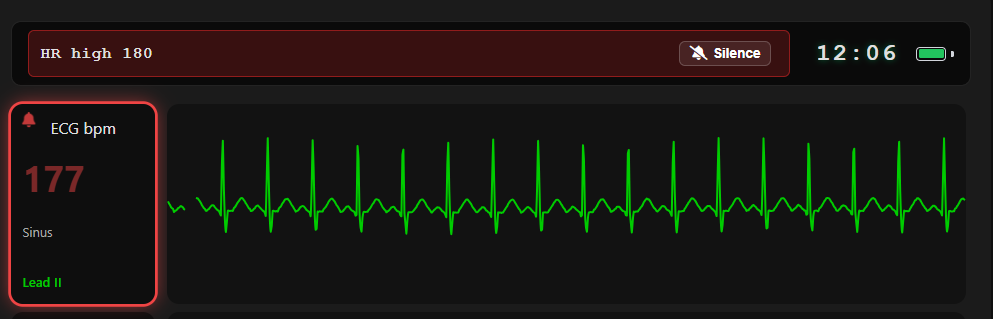
A full alarm system arrives on the student monitor, complete with an on-screen alarm bar, escalating alarm levels, and silence controls — bringing TMA in line with real-world bedside monitoring.
Session activity is now captured in a running event log, giving instructors a clear record of what happened and when during a simulation.
One instructor, many sessions.
Session Selector: A tappable selector in the controller header opens a live overlay showing vitals and alarm states across every session you control.
At-a-Glance Alerts: If an unviewed session goes critical, the selector flashes the highest active alarm color.
Independent Sessions: Switching views never pauses a session — trends and timers keep running in the background.
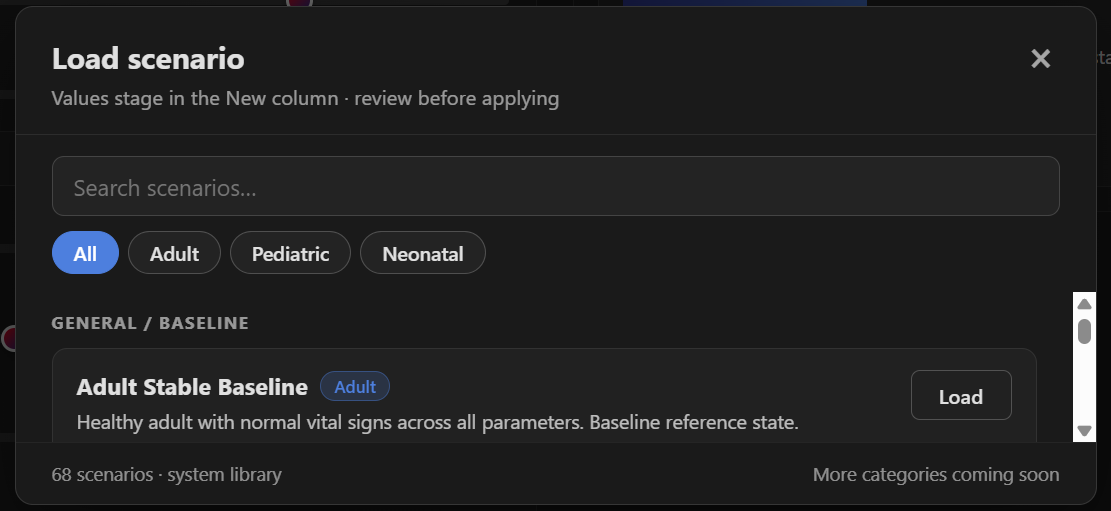
A new scenario dropdown loads complete vitals presets onto the controller in one click, with a guidance tooltip for each scenario — perfect for rapid scenario setup between student groups.
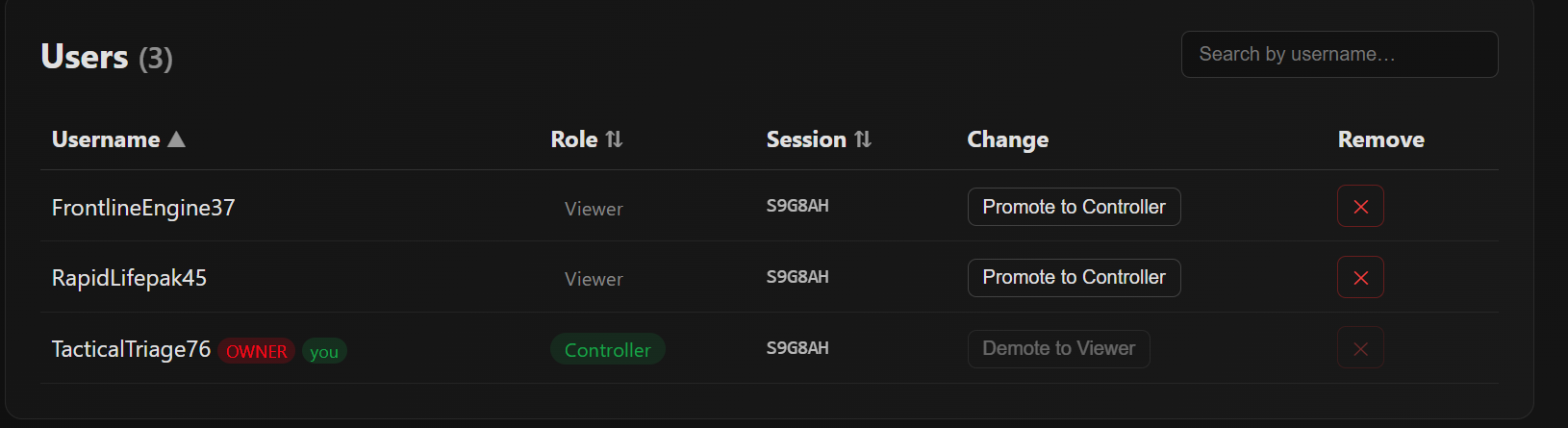
Expanded session management tools give instructors finer control over how sessions are created, joined, and run.
Have an idea or found a bug? Our new feedback portal is live at feedback.trainingmonitor.app — submit requests, vote on features, and follow our public roadmap.
Improved
"Reset to Default Vitals" is now Reset Session, with a confirmation modal to prevent accidental resets. One click restores all vitals to defaults, returns the rhythm to Sinus, clears BP history, and updates the monitor immediately.
When a vital is set to Not Visible, any alarm tied to it now hides as well — no more orphaned alarms for hidden parameters.
Turning Rhythm Identification off now removes the rhythm name entirely instead of blurring it.
QRS Beep now defaults to off for quieter session starts.
Session codes no longer use the easily-confused characters I or 1.
Narrow screens now display a recommendation to use a tablet or computer for the best controller experience.
Fixed
Vital changes now update waveforms moving forward only — the trace already drawn on screen is never rewritten.
Toggling the Display Monitor off now hides the alarm bar and silences all alarm and QRS audio.
Removed duplicate % from the SpCO label.
Resolved a glitch where a previous Heart Rate value persisted after updating.
Silence button text is now readable in light mode.
Header elements no longer overlap or cut off at certain widths.
Fixed container overlap in the battery menu.
Light and dark mode display spacing now match.
ECG dropdown heights standardized.
Added padding inside the Clear BP Hx button.
May 23rd, 2026
New
Improved
Fixed

New
Apply vital changes gradually over 3–300 seconds instead of instantly, simulating realistic physiological responses to interventions.
Pause / Play / End Trend controls let you freeze, resume, or stop a trend while keeping vitals exactly where they are.
Live countdown and target values (e.g., "HR: 60 → 100 | 40s remaining") so you always know what's in motion.
Synchronized timing: all vitals changed in a single Apply start and finish together.
Server-side execution: trends keep running even if you switch screens or close your tab.
Blood pressure now behaves like a real cuff: values stay hidden until measured, teaching students that BP is a snapshot in time, not a continuous reading.
NIBP Button: Press on the monitor to start a 15-second measurement cycle.
AUTO Cycling: Set automatic measurements at 5, 10, or 15-minute intervals; manual cycles reset the timer.
BP History: The monitor displays the 5 most recent readings with timestamps.
Clear BP Hx: A controller-side button wipes the history between scenarios.
Sessions now have two access levels, giving instructors full command of who sees what.
Viewers join via QR code or session ID and see only the Display Monitor.
Controllers join via a dedicated controller code with full access to vitals controls.
Auto-Generated Usernames: Every user receives a unique name so instructors can identify devices at a glance.
Session Management Page: Promote, demote, or remove users in real time from a sortable, searchable user table.
Improved
Display Monitor, AED Trainer, Rhythm Identification, and NIBP Auto Cycle toggles have moved off the main controller screen into a clean popup, freeing up valuable screen space during live simulations.
Changed values are now emphasized so you can instantly spot what's staged to update.
Tighter desktop layout with restructured action buttons and less white space.
Mobile buttons reorganized into a square grid for easier tapping
Session IDs no longer use the easily-confused characters O or 0.
Typing a session ID now auto-capitalizes — no more case-sensitivity failures when joining.
Fixed
Controller spacing and layout now match across both themes for a consistent experience.
Vital trend tooltip no longer cut off at the screen edge.
Alarm button icons repositioned away from container borders.
Reduced excess white space between ECG and Shock Outcome dropdowns.
May 9th, 2026
New
Improved
Fixed

New
Introduced a new dropdown menu for Pleth Shapes. Similar to ECG rhythms, instructors can now select different waveform morphologies to change the visual shape of the plethysmograph on the student monitor.
Note: The waveform rate remains intelligently linked to the patient's Heart Rate.
Added a new vital slider called Pleth Amplitude (Range 0-100). This allows instructors to manually adjust the vertical amplitude of the waveform.
0: Results in a flat line (non-pulsatile).
100: Displays a full-strength waveform.
Proportional Scaling: Adjusting this slider condenses the waveform vertically without affecting the horizontal timing or baseline, simulating varying perfusion levels.
Introduced Pulse Transit Time (PTT) controls to provide a more clinically accurate relationship between the ECG and the SpO2 waveform.
Dynamic Waveform Positioning: The Pulse Ox pleth waveform now intelligently sits to the right of the ECG R-wave rather than overlapping it, simulating the physical time it takes for a pressure wave to reach the periphery.
New PTT Slider: Instructors can now manually adjust the transit delay between 150ms and 500ms (Default: 250ms).
Improved
Optimized the behavior of the Pulse Oximetry Pleth so that adjusting the SpO2 % value now only updates the numerical data on screen. Previously, lowering the percentage would also shrink the waveform; these are now independent to allow for more accurate clinical simulations.
To improve clinical clarity and ensure the student monitor matches real-world medical equipment, we have standardized the display of units across all vital sign tiles.
Integrated Units: Units are now appended directly to the vital label (e.g., Heart Rate: bpm) instead of taking up a separate row. This maximizes screen space while providing immediate context for the data being viewed.
Updated the instructor controller with a new layout and streamlined design to ensure a clearer viewing experience and easier navigation across all your devices, allowing you to focus on the simulation and see exactly what is happening at a glance.
Fixed
Updated the header clock to a 24-hour military format and removed the AM/PM designators to better align with professional clinical monitoring standards.
May 2nd, 2026
New
Improved
Fixed

New
Persistent Sessions: The app now automatically remembers your last session ID across browser restarts and tab closures, so you can pick up exactly where you left off.
Smart Resume Prompt: If you return after 60 minutes of inactivity, you’ll be greeted with a "Welcome Back" prompt. You can now choose to Continue Previous Session to keep your data or Start New Session for a fresh slate.
Community Success Stories: Added a new Use Cases gallery featuring real-world feedback and hardware setups from EMS educators and healthcare professionals.
Smart Search & Filtering: Quickly find inspiration by filtering articles by Country, Provider Level (EMT, Nursing, etc.), or Training Environment (Skills Lab, MCI Simulation, etc.).
Interactive Submission Form: Share your own configuration via the Submit Your Use Case form. Help the community by detailing your hardware (tablets, TVs, laptops) and how the app improves your student's experience.
EtCO2: You can now toggle EtCO2 measurements between mmHg and kPa on the controller.
Glucose: You can now toggle glucose measurements between mmol/L and mg/dL on the controller.
Improved
Manual Vital Synchronization: To prevent accidental vital changes during a live simulation, selecting a new ECG rhythm no longer automatically overrides current patient vitals.
"Set Vitals to Default" Button: Added a new control toggle underneath the rhythm dropdown. This allows the controller to explicitly choose when to sync the patient's vitals to the rhythm's pre-set defaults (e.g., at the start of a scenario), while maintaining the current vitals if only a rhythm change is desired mid-simulation.
Real-Time AED Status: Enhanced the AED module to sync state across all devices in a session. When one display initiates an "Analyze" sequence, all other connected displays will now show the automation progress in real-time.
Decoupled SpO2% from Waveform Height: Optimized the behavior of the Pulse Oximetry Pleth so that adjusting the SpO2% value now only updates the numerical data on screen.
Independent Scaling: Waveform amplitude is now controlled exclusively by the new Pulse Oximetry Pleth Strength slider (range 0-10), ensuring that clinical values and visual waveforms can be adjusted independently for more realistic simulation scenarios.
Fixed
Dynamic Waveform Rate: Resolved an issue where the Pulse Ox pleth waveform remained at a constant rate regardless of patient vitals.
Heart Rate Integration: The waveform is now successfully linked to the Heart Rate slider.
Unified Controller Layout: Fixed a bug where light and dark modes used different spacing and element positioning. The controller interface is now consistently condensed across both themes, ensuring buttons and sliders remain in the same location regardless of your display mode.
Reduced Vertical Padding: Optimized the mobile interface by reducing excessive vertical white space. This ensures more content is visible on the screen at once, providing a tighter and more professional look for users on smaller devices.
Darkened the green color for ECG waveforms and text to improve contrast and readability against light backgrounds.
Status Indicator Correction: Resolved a bug where the green/red status dot on the vitals card would turn red if Respiratory Rate (RR) was set to "Not Visible," even if EtCO2 was still active.
Visibility Lock: Fixed a critical bug where using the AED trainer would cause all active vitals (ECG, SpO2, etc.) to automatically switch to "Not Visible."
April 25th, 2026
New
Improved
Fixed

New Features
We’ve moved the Display Settings away from the student monitor and placed full control exactly where it belongs: with the instructor. This update allows for a more "organic" simulation experience where vitals are only revealed as students perform the necessary clinical interventions.
Real-Time Controller Toggles: Each vital sign on the Control Vitals page now features an individual toggle.
V (Visible): The toggle turns Green, and the vital appears on all connected student monitors instantly.
NV (Not Visible): The toggle turns Red, and the vital is hidden from the student view.
Instant Updates: Toggle changes are pushed in real-time. There is no need to click the "Apply New Vitals" button to hide or show a parameter.
Master Visibility Toggle: A "Global" toggle at the top of the vitals list allows instructors to show or hide all parameters simultaneously with a single click.
Student View Indicators: When a vital is hidden, a small red dot appears in the upper right-hand corner of the monitor tile to indicate the sensor is "off." This dot turns green once the vital is toggled on.
Scenario Setup: Before the students enter the room, use the Master Toggle on the controller to set all vitals to NV. This creates a "blank" monitor, simulating a patient who has not yet been hooked up to equipment.
Revealing Vitals: As students apply leads or sensors (e.g., placing a pulse oximeter), click the toggle next to the corresponding vital (e.g., SpO2 and Pulse Rate).
Dynamic Assessment: If a student removes a lead or a sensor falls off during the simulation, toggle that vital to NV to prompt the students to troubleshoot their equipment.
Waveforms Identification Practice: Use the dedicated ECG Toggle to display the cardiac rhythm independently of the numerical heart rate value to test the students' rhythm recognition skills.
Note: When creating a new session, the system defaults to ON (V) with red status indicators, allowing you to build the clinical picture from scratch every time.
We are excited to announce the release of the AED Training Simulator, a comprehensive update designed to provide students with a realistic, high-stakes environment for practicing cardiac emergency response.
Integrated Student View: The AED Simulator is now located directly on the Display Monitor Page, ensuring students can interact with it in their primary training view.
Automated CPR Clock: Once a shock is delivered, a 2:00 CPR countdown begins automatically.
Metronome: A 110 BPM metronome click plays throughout the CPR cycle to guide chest compressions.
Mute Toggle: An audio icon has been added to the AED display to mute the CPR metronome if necessary.
Auto-Analysis: At the end of the 2-minute cycle, the system triggers an "Analyzing patient" alert (audio and visual).
Smart Shock Logic: * Energy is fixed at 200 J (standard AED protocol).
If a shockable rhythm is detected, the system charges for 7 seconds, then repeats the prompt: "Shock Ready, press flashing red button, do not touch the patient" until the shock is delivered.
Instructor Shock Outcomes: Instructors can now pre-determine the result of a shock via a new dropdown on the controller. Options include:
No Effect
V-Tach
V-Fib
Asystole
Normal Sinus
Sinus Tachycardia
Initiate Training: Launch the Display Monitor for the student and the Control Vitals page for the instructor.
Enable AED Mode: On the controller, navigate to the AED section and toggle the simulator ON.
Set the Outcome: Use the Shock Outcome dropdown to select what rhythm the patient will convert to after the student delivers a shock.
Analyze & Shock:
The student clicks Analyze on the monitor.
If the current rhythm is shockable (e.g., V-Fib), the AED will prompt the student to clear the patient and deliver the shock.
Perform CPR: After the shock, the CPR Clock and metronome will start. The instructor does not need to reset the clock; it will run for the full 2 minutes regardless of any rhythm changes made on the backend.
Reset: To restart the simulation from the beginning, use the Reset Monitor AED button on the controller.
We’ve introduced Cookie Controls to improve how the app handles browser restarts and inactivity. The platform now remembers your last session ID across tabs and window closures, but will intelligently prompt you with a choice—"Continue Previous Session" or "Start New Session"—after 60 minutes of inactivity to ensure you don't accidentally join an outdated simulation.
Improvements
We have updated the instructor dashboard with more intuitive button labels and a clear color-coded system to improve navigation speed and prevent accidental resets during live sessions.
Updated Button Text:
“Apply New Settings” is now “Apply New Vitals”
“Reset to Default” is now “Reset to Default Vitals”
“Display Monitor” is now “Go to Display Monitor”
Enhanced Visual Logic:
Action (Bright Green): The “Apply New Vitals” button is now bright green to clearly highlight the primary action for pushing data to students.
Navigation (Blue): The “Go to Display Monitor” button is now blue to distinguish screen navigation from data controls.
Warning (Red): Critical actions like “Reset AED” and “Reset to Default Vitals” remain red to indicate high-impact changes.
These updates are live across both Desktop and Mobile views to ensure a consistent experience regardless of which device you use to control your simulation.
We have streamlined the instructor dashboard to give you more precise control over what students see on their monitors, allowing for a seamless transition between full vitals monitoring and dedicated AED training.
Master Display Monitor Toggle: A new "Display Monitor" toggle allows you to hide the entire vitals suite (ECG, SpO2, EtCO2, BP, Temp, and Glucose) with one click. This is perfect for scenarios where students must first "power on" the monitor or when you want to use the screen exclusively as an AED Trainer.
Simplified Rhythm Identification: The rhythm naming toggle has been updated to a simple ON/OFF switch.
ON: The rhythm name is visible to students.
OFF: The rhythm name is hidden, forcing students to interpret the waveform manually.
Interactive Tooltips: We’ve replaced bulky on-screen help text with sleek Information Icons (i).
Desktop: Hover over the icon to see the function description.
Mobile: Tap the icon to view guidance.
Optimized Layout: Controls are now grouped into a single row on desktop and a compact grid on mobile to save space and reduce scrolling during high-speed simulations.
Refined Reset Action: The "Reset AED" button has been relocated to the bottom of the control section and its label shortened for better clarity on smaller screens.
By toggling the Display Monitor to OFF and the AED Trainer to ON, you can instantly convert the student station into a standalone AED training unit.
Bug Fixes
Fixed a visual issue where the SpO2 flatline was center-justified when the value dropped to 0%. The waveform now correctly justifies to the bottom of the display section, providing a more accurate and clinically realistic representation of a lost signal or pulseless state.